 uprise
For clothing brands · 11 min video
Why your clothing brand Facebook ads stopped working
Your first week of ads printed. Now you're spending the same budget and getting nothing. It's not the algorithm. It's one of five things, and you can find yours in about two minutes.

Check these in order: 1. frequency above 3 (creative fatigue), 2. only one or two ads running, 3. you edited the campaign in the last 7 days, 4. your ROAS is under break-even, 5. clicks but no sales (the product page). Fix the first one that's true.
Watch on YouTube: youtube.com/@rioscaled
- Why your ads stopped working
- A real ad account, first week
- Reason 1: Your ad got old
- Reason 2: You're not running enough ads
- Reason 3: You keep touching your ads
- Reason 4: Your margins can't afford ads
- Reason 5: The ad works, the page doesn't
- Quick diagnosis: find your number
The account in the video
Everything here comes from an account I'm running right now. It's a $67 online course, not clothing, but Meta runs it the same way: one product, people buying it. When I filmed, it was six days in: about $307 spent, 24 purchases, and roughly $12.80 per purchase. The full first week finished at $357.86 spent and 27 Meta purchases. See the live case study with daily numbers.
Reason 1: Your ad got old
Frequency is how many times the average person has seen your ad. It's your creative fatigue meter. In the account above it sits around 1.4 to 1.5, which is healthy.
Above 3, your ad is tired. The same people keep seeing it and stop reacting. The fix is to add a new ad next to the winner. Don't edit the winner. Editing restarts its learning, and you lose the thing that was working.
Reason 2: You're not running enough ads
You have to give people five different reasons to buy. Most brands I see run one or two ads, or one ad with five different captions. That's still one reason to buy.
Pick your hero product and make five formats, each aimed at a different buyer:
- Try-on. Shows the fit. Not knowing how it fits is the number one reason people don't buy clothes online.
- Drop countdown. If you sell in limited drops, push the deadline. It's gone soon is a reason to buy now.
- Founder story. Why you made it. This is what builds a brand people stick with.
- Customer reactions and reviews. Real people wearing it and saying it's good.
- Quality close-ups. Stitching, fabric, weight. People are wary of social media brands they've never heard of, and close-ups answer that.
Meta finds buyers through the creative. Five different reasons reach five different groups of people. Run five to ten ads per product, depending on budget. On a small budget, five is plenty.
Reason 3: You keep touching your ads
One bad day hits, it feels like you're losing money, and you start editing. That's the most expensive habit in paid ads.
Meta runs every new campaign through a learning phase that looks for about 50 conversions in 7 days. Each edit pushes it back. Running a tiny budget does the same thing, because it takes longer to reach those conversions.
Here's the first week from the account in the video:
| Day | Spend | Purchases | Cost / purchase |
|---|---|---|---|
| 1 | $24.97 | 2 | $12.48 |
| 2 | $43.97 | 4 | $10.99 |
| 3 | $60.09 | 9 | $6.68 |
| 4 | $47.52 | 2 | $23.76 |
| 5 | $51.40 | 3 | $17.13 |
| 6 | $71.38 | 4 | $17.84 |
| 7 | $58.53 | 3 | $19.51 |
Meta Ads Manager, Sep 27 to Oct 3, 2026.
Day 3 to day 4, cost per purchase went from $6.68 to $23.76 overnight. Kill on a bad day and you kill the winner. Drops swing even harder than this. My rules:
- Never judge an ad on three days.
- Raise budget 20% at a time, max. Bigger jumps reset learning.
- No edits while it's learning. Let it find the buyers.
Reason 4: Your margins can't afford ads
This one sounds too simple, and it's why a lot of brands with "good" ROAS still lose money. Before you blame Meta, do the math: what the piece costs to make, what you sell it for, shipping, and payment fees.
Example: a $45 hoodie that costs $18 to make, $6 to ship, and $1.60 in fees. You keep $19.40 per order before ads. Break-even ROAS = price ÷ profit per order = 45 ÷ 19.40 = 2.32x. Every $1 in ads has to bring back $2.32 just to make zero dollars.
The trap: sales are coming in, Ads Manager says 2x, and you think you doubled your money. You didn't. At 2x on this hoodie you lose money on every order. Plug your numbers into the break-even calculator.
If your margins can't carry ads, fix that first. Raise the price, cut costs, or bundle. Then turn ads back on.
Reason 5: The ad works, the page doesn't
Lots of clicks, no sales. That's not an ad problem. Open your product page on your phone and check:
- Loads in under 3 seconds
- Photos are on a real person
- Size chart sits right under the price
- Shipping cost shows early, not at checkout
- You can add to cart without scrolling
Then trust. People don't trust random brands on social anymore, mostly because they've been burned by long shipping times. Customer photos under the product, reviews, a free shipping threshold, and a story that matches your ads all move conversion. Fix the page before you spend another dollar. More traffic to a broken page just costs more.
To check it in Meta, compare link clicks to checkouts initiated. Lots of clicks with few checkouts means the page. Lots of checkouts with few purchases means checkout friction, which email and SMS abandoned cart flows help recover.
Quick diagnosis: find your number
| If this is true | It's reason | Fix |
|---|---|---|
| Frequency is over 3 | 1. Creative fatigue | Add a new ad next to the winner |
| Only 1 or 2 ads running | 2. Not enough ads | 5 to 10 ads, each a different reason to buy |
| You edited it this week | 3. Touching it | Stop editing, scale 20% at a time |
| ROAS under break-even | 4. Margins | Fix price or costs, then restart |
| Clicks but no buys | 5. The page | Run the phone checklist, add trust |
Fix the first one that's true. Don't fix all five at once or you won't know what worked.
Questions
Is it the algorithm?
Almost never. When the same budget stops producing, it's one of the five above. The algorithm is doing what your creative, budget, and page tell it to.
Should I turn my ads off when results drop?
Not on one bad day. Look at 7 days. Only turn them off if you're under break-even ROAS for the week, and fix the cause before turning them back on.
How much budget do I need to start?
The account above started at $25 a day. Enough budget to get conversions every day matters more than a big number. Below that, the learning phase drags on.
What's a good ROAS for a clothing brand?
Anything comfortably above your break-even. For the $45 hoodie example that's 2.32x, so 3x would be profitable and 2x would lose money. There's no universal number, only yours.
Keep going
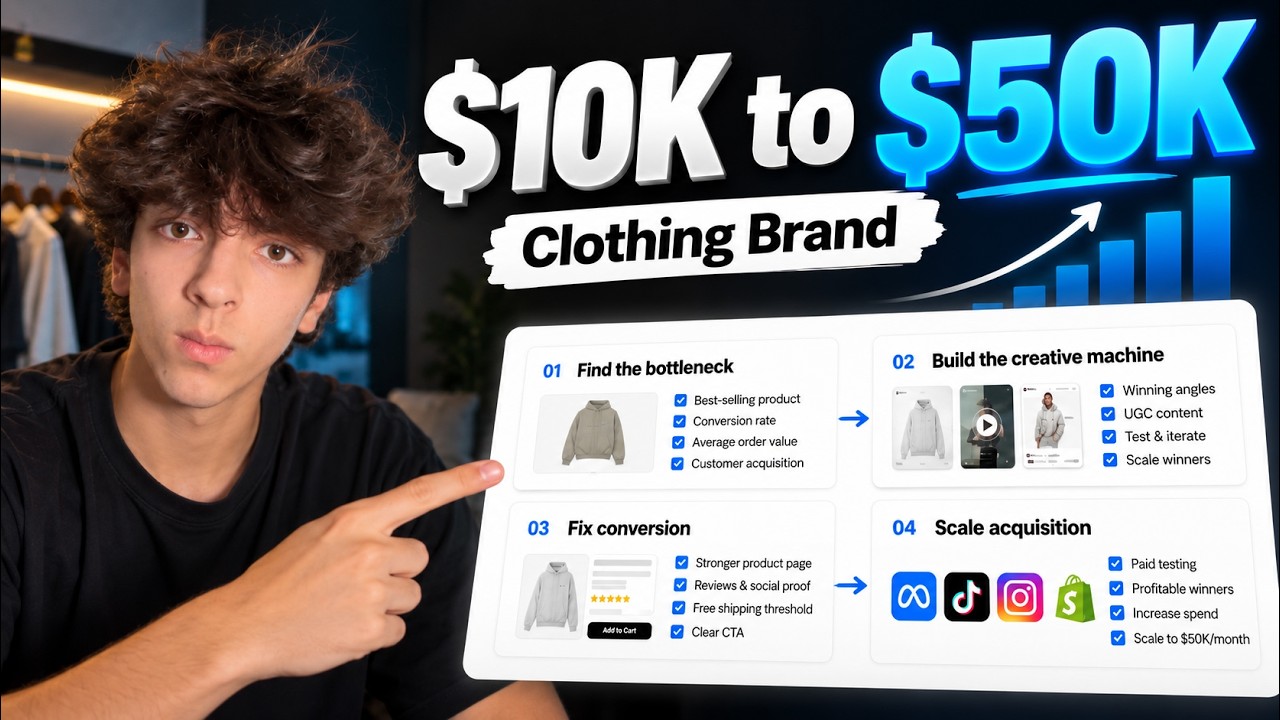
The system around the ads: bottleneck, creative, conversion, acquisition, retention.
The account from this video, day by day and ad by ad.
Want me to look at your ads?
Pick a time. On the call I'll tell you which of the five it is and what I'd change first.
Calendar not loading? Open it here.